Deployment
Deploying Next.js on Vercel: Preview, Env Vars, and Rollbacks
Preview deployments, environment variable scoping, and rollbacks are the three features that make Vercel releases safe by default — here's how to actually use them, and the mistakes that quietly defeat each one.
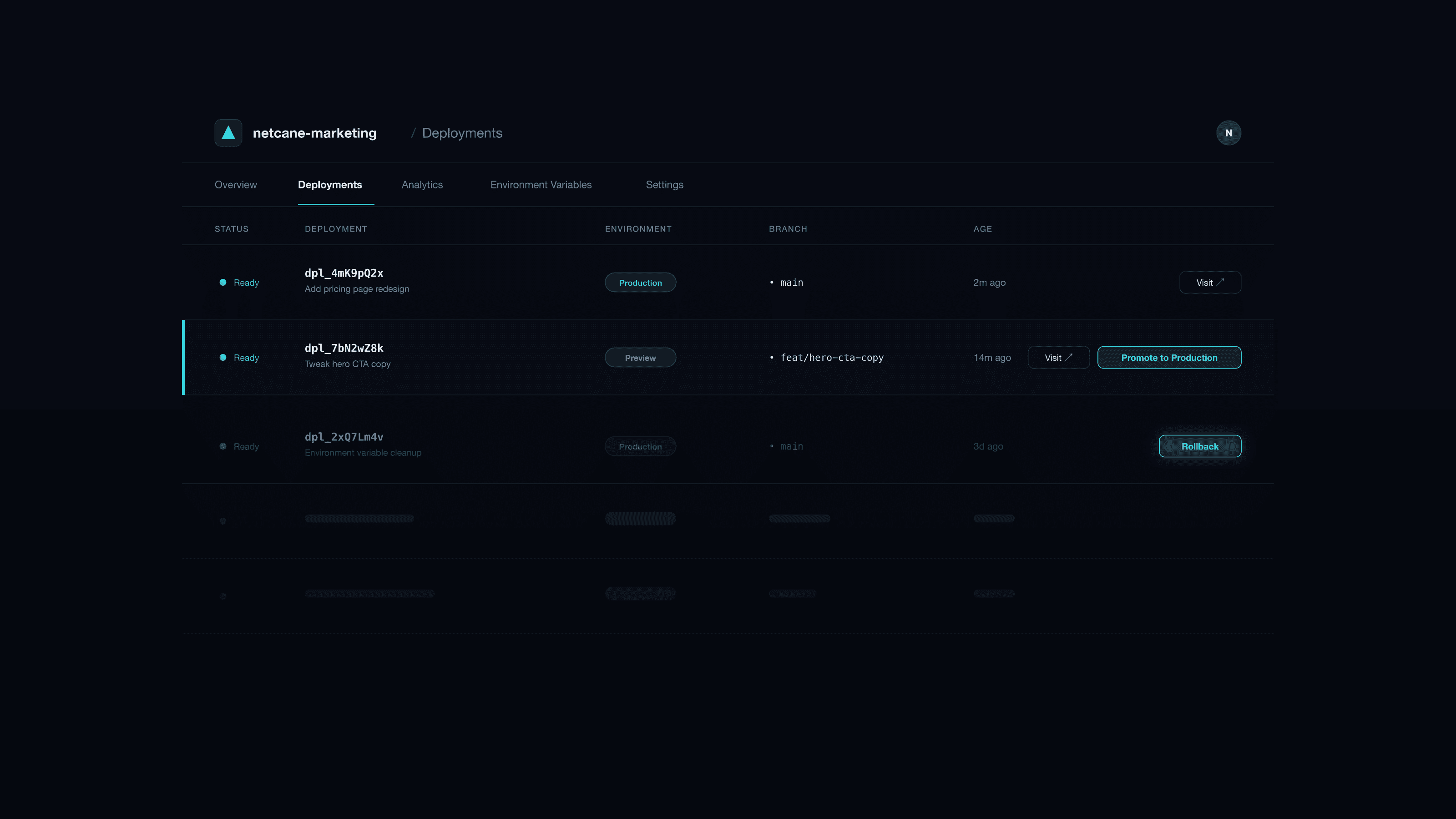
Vercel makes deploying Next.js close to trivial — connect a repo, push, done. That simplicity is also why teams under-use the three features that make deployment genuinely safe, not just easy: preview deployments, properly scoped environment variables, and instant rollbacks. Getting a build live is the easy 80%. Getting a broken build off production in under a minute, without a git revert and a re-deploy, is the part that separates a team that's had one bad Friday from one that hasn't.
Preview deployments: more than a visual check
Every branch push (and every PR) gets a unique, shareable URL running the actual branch code against real infrastructure — not a mock. That last part matters: a preview deploy is close enough to production that it catches integration bugs, not just visual ones, provided you configure it correctly.
The configuration that makes previews actually useful: preview-scoped environment variables, set separately from production in Vercel's dashboard (Project Settings → Environment Variables, with the environment scope set to Preview rather than Production). Point preview at a staging API, staging database, or test-mode payment provider — never production. Without this, "test on the preview URL" either means testing against live customer data (dangerous) or developers avoiding the preview URL for anything that touches real data (which defeats the purpose).
Once that's wired correctly, previews earn their keep two ways:
- Stakeholder review — a designer or PM can click through an actual working build before merge, not a screenshot or a description of the change.
- Automated checks against a real URL — E2E tests (Playwright, Cypress) can run against the preview deployment directly, testing the actual built app rather than a local dev server that behaves slightly differently.
Environment variables: the three-way split most teams get wrong
Vercel supports distinct values per environment — Production, Preview, and Development — and the mistake we see most often is treating this as optional rather than load-bearing. A single shared .env mentality (same API keys everywhere) means a bug on a preview branch can write to a production database, or a preview deploy silently starts hitting rate limits meant for one environment.
The split that works:
| Variable type | Production | Preview | Development |
|---|---|---|---|
| API keys / secrets | Live keys | Test/sandbox keys | Test/sandbox keys |
| Database URL | Production DB | Staging DB | Local or staging DB |
Public config (NEXT_PUBLIC_*) | Production values | Staging values | Local values |
A few specifics worth calling out directly:
- Never commit secrets, obviously — but also never let a developer's local
.env.localbecome the de facto source of truth for what preview should have. Set it in the dashboard so it's consistent for every contributor and every CI run. NEXT_PUBLIC_-prefixed variables ship to the browser bundle. Anything without that prefix stays server-side only. This is a genuine security boundary, not a naming convention — double-check before prefixing anything that touches a key or secret.- Redeploy after changing env vars. Next.js inlines
NEXT_PUBLIC_*values at build time; a variable changed in the dashboard doesn't take effect until the next build, which trips people up when a "fix" doesn't seem to apply. - Document required variables somewhere a new developer or CI pipeline can find — a
.env.examplewith keys (not values) checked into the repo is the minimum; a short README section on what each one does and where to get a test value saves the first-day setup friction every time.
Rollbacks: the feature most teams don't know they have
Vercel keeps every deployment, and rolling back doesn't require touching git at all — you don't need to revert a commit, force-push, or re-run a build. Open the Deployments list, find the last deployment that was known-good, and promote it to Production directly. It's live again in seconds, using the exact artifact that was already tested and working, not a fresh build that might behave differently.
This matters because the instinct under pressure is often to "fix forward" — push a quick patch and redeploy. That's slower (a new build has to run) and riskier (the patch is being written and reviewed under time pressure, with the site still broken). The better sequence, every time:
- Roll back immediately to restore service. This takes under a minute and requires no code changes.
- Diagnose calmly, with the site already stable again.
- Fix on a branch, go through the normal PR and preview flow, and let it merge and deploy through the regular process — no shortcuts, because the pressure that caused the original mistake is exactly what causes the next one.
The git history doesn't need to reflect the rollback immediately — you can revert the branch afterward as cleanup, once the fix is actually ready, rather than as an emergency action.
Branch strategy: what triggers what
Connect the repository and set the production branch explicitly (usually main) in Project Settings → Git. Every push to that branch triggers a production deploy; every other branch gets a preview deploy automatically. Add branch protection in your git host (required reviews, required status checks) so nothing reaches the production branch without at least one other set of eyes — Vercel doesn't enforce this itself, your git provider does.
If your team wants an extra gate, require the preview deployment to be manually approved (a checked box, a Slack thumbs-up, whatever fits the team) before merge — this costs almost nothing in speed and catches the "looked fine in the diff, broken in the browser" class of bug that code review alone misses.
The three features together
Preview deployments catch bugs before merge. Scoped environment variables make sure "tested on preview" is actually evidence, not theater. Rollbacks make production mistakes a sixty-second problem instead of a fire drill. None of them require a platform team to set up — they're Vercel defaults, mostly waiting to be configured correctly rather than built from scratch.
We wire this exact setup — scoped envs, branch protection, verified rollback path — into every Next.js project we ship, so a bad deploy is an inconvenience, not an incident. If your team is deploying Next.js on Vercel and isn't confident the rollback button would actually work cleanly right now, that's worth testing deliberately before you need it under pressure — or get in touch if you'd like a second set of eyes on the setup.
Related reading
- StrapiStrapi + Next.js Preview Mode: Drafts Without PainHow to show Strapi draft content in Next.js using preview mode and a secure token so editors can preview before publish.
- DeploymentStaging vs Production: A Release Process Small Teams Can RunA release flow that catches real problems before production without a dedicated DevOps team — what staging is actually for, where small teams cut corners safely, and where they shouldn't.
- CMS ArchitectureHeadless CMS Implementations: Process, Stack Choices, and What They CostA senior engineer's guide to headless CMS implementations — discovery through launch, how to choose Strapi vs Contentful vs Sanity vs Builder.io, realistic budgets, and timelines from 20+ production client builds.
More in Strapi