CMS Architecture
Headless CMS Implementations: Process, Stack Choices, and What They Cost
A senior engineer's guide to headless CMS implementations — discovery through launch, how to choose Strapi vs Contentful vs Sanity vs Builder.io, realistic budgets, and timelines from 20+ production client builds.
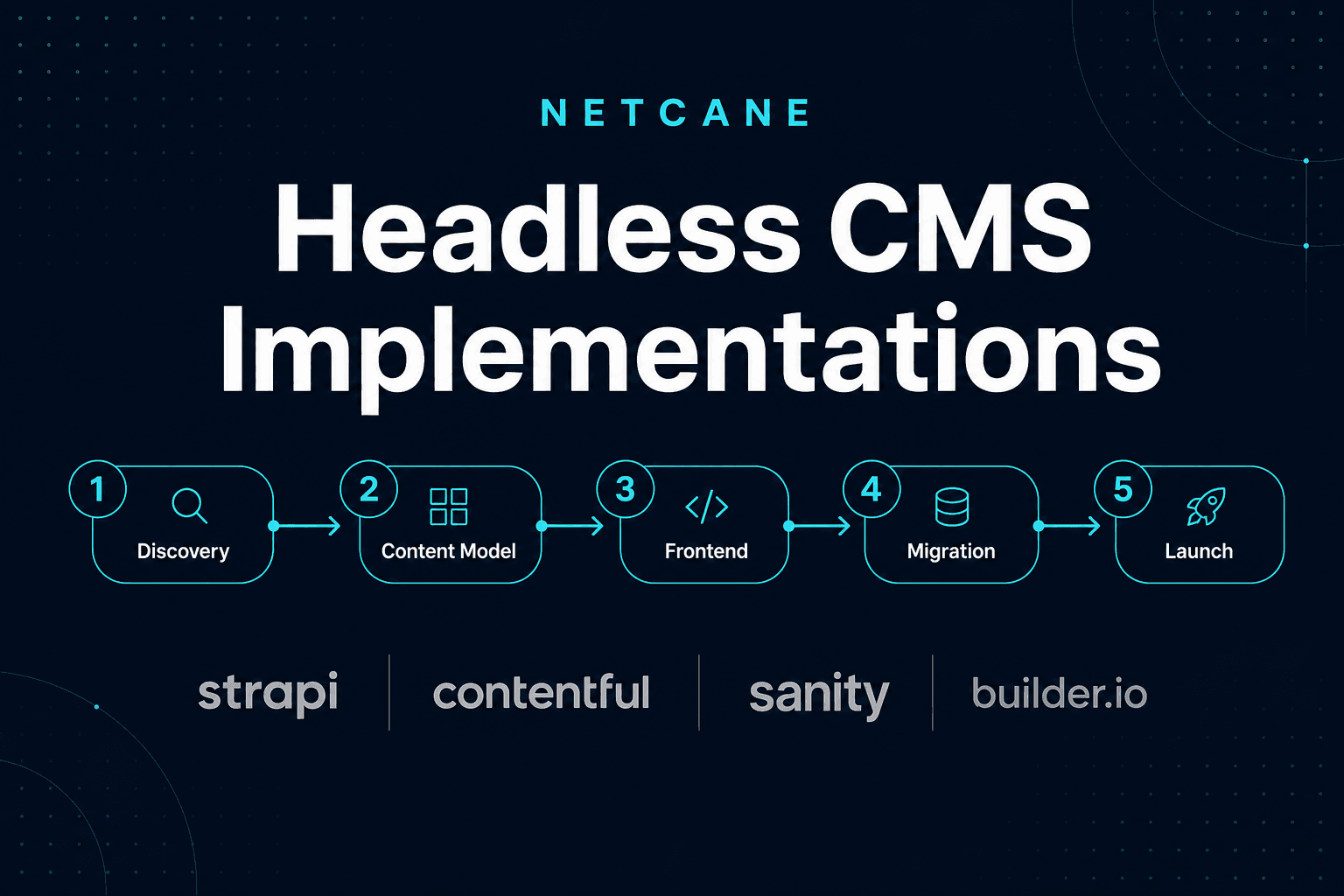
Headless CMS implementations are how modern marketing teams escape the tradeoff between editorial speed and front-end performance. Instead of wrestling with WordPress themes, page-builder bloat, or a CMS that dictates your HTML, you split the stack: the CMS stores structured content; Next.js (or another framework) owns presentation, SEO, and Core Web Vitals. That separation is simple in theory and messy in practice — which is why process, platform choice, and realistic budgeting matter more than any single tool logo.
This guide walks through how we deliver headless CMS implementations at Netcane: the five-phase process from discovery to launch, how we choose between Strapi, Contentful, Sanity, and Builder.io, what migrations actually involve, and what you should expect to pay and wait. It is written for marketing leaders, agency owners, and technical stakeholders who need a shared vocabulary before signing a scope.
Why teams move to headless
The trigger is rarely "we want a headless CMS." It is usually one of these:
- Launch velocity — Product marketing needs new landing pages weekly; developers are the bottleneck.
- Performance — Core Web Vitals scores stall because the monolithic CMS loads plugins, fonts, and scripts you cannot control.
- Multi-market — Locales, legal disclaimers, and regional campaigns need structured content without duplicating entire sites.
- Integration load — Forms, CRM, analytics, personalization, and search each added a plugin; the stack is fragile.
- Scale — A catalog or resource library outgrew what the current CMS can model cleanly.
Headless does not remove complexity — it moves it to a place you can govern. You will maintain two systems (CMS + front end) unless you buy a fully managed visual platform. The payoff is control: your React components define layout; your content model defines what editors can change; your Next.js app defines how pages render for crawlers and users.
The five-phase implementation process
Every headless CMS implementation we ship follows the same spine. Skipping a phase — especially content modeling before frontend work — is how projects slip from six weeks to six months.
Phase 1: Discovery
Discovery is not a sales call. It is a working session (or short series) to produce a written scope everyone signs off on.
We document:
- Stakeholders — Who approves content? Who approves design? Who owns integrations?
- Page inventory — Marketing pages, blog, resources, legal, account-adjacent surfaces.
- Integrations — Forms, HubSpot, Intercom, GTM, search, auth, commerce hooks.
- Locales — Now or later? Which fields vary per locale?
- Migration source — WordPress export, another CMS, spreadsheets, greenfield?
- Success metrics — Launch date, performance budget, SEO must-haves.
Output: a scope doc with page templates, content types, migration volume, timeline, and a fixed estimate band. No CMS configuration starts until this exists.
Phase 2: Content model
The content model is the contract between editors and developers. Get it wrong and every future page is a custom dev ticket.
We design around pages, sections, and blocks:
- Pages hold slug, SEO fields, and an ordered list of sections.
- Sections are full-width layout regions (hero, feature grid, testimonial band).
- Blocks are reusable atoms inside sections (CTA button, stat, logo row).
Relations matter: authors linked to posts, products linked to categories, related articles. Slug conventions are fixed early (/blog/[slug], /solutions/[slug]) so Next.js dynamic routes stay predictable.
For each content type we define:
- Required vs optional fields
- Validation (max length, allowed embeds)
- Localization strategy
- Preview requirements
- Who can publish vs draft
This phase typically runs one to two weeks for a marketing site. Large catalogs or multi-brand models take longer — and that is time well spent.
Phase 3: Frontend
The Next.js App Router frontend is where SEO and performance are won or lost.
Our default patterns:
- Server Components for page shells and data fetching
- Typed fetch layers — one module per CMS, mapping API responses to normalized shapes components consume
- Draft preview — Next.js
draftMode()wired to the CMS preview API - ISR or on-demand revalidation — webhooks on publish, not full redeploys for typo fixes
- Metadata —
generateMetadatadriven by CMS SEO fields - Structured data — JSON-LD for Organization, Article, FAQ, Product as appropriate
- Sitemaps and redirects — generated from CMS slugs plus a static redirect map for migrations
We set a performance budget during frontend build: LCP target, JS bundle ceiling, image sizing rules. Headless is not automatically fast — it is fast when the front end is intentionally lean.
Phase 4: Migration
Migrations are the most underestimated line item in headless CMS implementations.
A small marketing site might migrate manually: 20 pages, copy-paste with spot checks. A WordPress site with ten years of posts, custom fields, and broken shortcodes needs scripts.
Our migration checklist:
- Export — WP XML, REST scrape, database dump, or CSV from the client.
- Normalize — Map legacy fields to the new content model; drop fields with no destination.
- Media — Download, resize, upload to CMS or CDN; rewrite URLs in rich text.
- Relations — Categories, authors, cross-links between entries.
- Slugs — Preserve URLs where possible; build 301 map for changes.
- Validation — Spot-check renders in Next.js preview, not just CMS admin.
For large catalogs (we have migrated 30,000+ products from WordPress to Strapi), we batch imports with error logs and reconcile counts before cutover.
Phase 5: Launch
Launch week is boring on purpose.
- Staging sign-off from marketing and legal
- Redirect map deployed
- Monitoring and error tracking live
- Editor training: publish, preview, media library, who to ping for front-end changes
- Runbook for webhook failures and cache invalidation
We stay on for a short hypercare window after go-live — usually one to two weeks — so the first real publishes do not happen alone.
Choosing a CMS: Strapi, Contentful, Sanity, Builder.io
There is no universal winner. Platform choice follows editorial workflow, budget, hosting preference, and how often layouts change without developer involvement.
Strapi
Strapi is open-source with self-hosting or Strapi Cloud. You own the database and API shape.
Strengths: No per-seat SaaS tax when self-hosted; extremely flexible content types; REST and GraphQL; strong for catalogs and custom admin extensions.
Tradeoffs: You operate infrastructure (unless on Cloud); visual editing is not native — editors work in the admin UI, not on the live page; plugin quality varies.
When we recommend it: B2B commerce, associations, internal tools with a CMS layer, clients who want data sovereignty, projects where API flexibility beats drag-and-drop.
Contentful
Contentful is enterprise SaaS with mature environments, roles, and preview.
Strengths: Governed workflows for large teams; excellent multi-locale patterns; predictable Delivery and Preview APIs; strong SDK ecosystem.
Tradeoffs: Cost scales with seats and API usage; less flexibility than self-hosted for exotic data models.
When we recommend it: Marketing orgs with multiple editors and approvers; companies already standardized on Contentful; multi-market rollouts with strict content ops.
Sanity
Sanity leads with schema-as-code, GROQ, and Studio customization.
Strengths: Portable Text for rich content without HTML chaos; real-time collaboration; fast schema iteration in Git; excellent Next.js community patterns.
Tradeoffs: GROQ learning curve for non-developers; Studio UX requires setup to feel polished for pure marketers.
When we recommend it: Content-heavy sites, developer-marketer partnerships, products where the blog and docs are first-class citizens.
Builder.io
Builder.io is a visual page builder registering your React components.
Strengths: Marketers compose pages from production components; A/B tests and personalization; reduces dev queue for landing pages.
Tradeoffs: Component registry must be maintained; not ideal as the only CMS for deeply relational content; pricing tied to visual editing features.
When we recommend it: Growth teams shipping weekly campaigns; sites where layout velocity matters more than complex relations; Builder + a lighter CMS for blog/data is a valid hybrid.
Decision matrix (quick reference)
| Factor | Strapi | Contentful | Sanity | Builder.io |
|---|---|---|---|---|
| Self-host option | Yes | No | No | No |
| Visual page building | Limited | Add-ons | Add-ons | Core |
| Multi-locale | Yes | Strong | Strong | Yes |
| Rich text model | Custom | Rich text | Portable Text | Component fields |
| Typical buyer | Eng-led | Marketing ops | Mixed teams | Growth/marketing |
We often run a one-week proof during discovery: model three representative pages in two finalist platforms and let editors click through. The right choice becomes obvious quickly.
What headless CMS implementations cost
Budget conversations go better with ranges tied to scope drivers — not mystery quotes.
$3k–$6k — Focused builds
- Handful of page templates (home, inner, blog post, contact)
- One locale
- Minimal or no migration (greenfield content)
- Standard forms and analytics
- 4–8 week timeline
Good for: startups, single-product marketing sites, MVP launches.
$8k–$15k — Typical marketing sites
- Block-based page builder pattern in the CMS
- 10–30 templates or section types
- Draft preview and editor training
- Moderate migration (blog archive, key landing pages)
- SEO package: metadata, sitemap, Core Web Vitals pass
- 6–10 week timeline
Good for: B2B SaaS, associations, ad-tech marketing sites — the bulk of our headless CMS implementations.
$15k–$30k+ — Complex programs
- Multi-locale from day one
- Large migrations (thousands of entries or products)
- Custom integrations (CRM, search, personalization)
- Commerce-adjacent catalogs
- Multiple stakeholder approval workflows
- 10–16+ week timeline
Good for: enterprise marketing, replatforming programs, headless commerce.
Ongoing costs beyond build
Remember line items after launch:
- CMS hosting/SaaS — Strapi Cloud, Contentful, Sanity, Builder subscriptions
- Front-end hosting — Vercel, AWS, etc.
- Retainers — Many clients keep 20–80 hours/month for new sections, integrations, and performance work
We publish headless CMS implementation services with case studies and FAQ if you want a scoped estimate for your page set.
Timeline: why six to twelve weeks is honest
Sales cycles compress timelines; reality does not.
| Week | Focus |
|---|---|
| 1–2 | Discovery, content model sign-off |
| 2–4 | CMS setup, frontend scaffolding, design system |
| 4–8 | Page templates, integrations, preview, migration scripts |
| 8–10 | Migration execution, QA, performance tuning |
| 10–12 | Staging review, training, launch, redirects |
Parallel work helps — migration scripts can run while templates are built — but content model churn is the main schedule killer. Lock the model early.
Rush launches skip redirect maps and editor training; they pay for it in 404s and Slack messages asking "why is my preview blank."
SEO and headless: myth vs practice
"We need WordPress for SEO" persists because many headless builds were implemented poorly — client-rendered SPAs with empty <title> tags and no sitemap.
Done correctly, headless helps SEO:
- Server-rendered HTML for crawlers
- Full control over heading hierarchy and semantic markup
- No plugin injecting duplicate meta tags
- Performance signals (LCP, INP) easier to optimize
Requirements we treat as non-negotiable:
generateMetadataper route from CMS fields- Canonical URLs and hreflang for locales
- XML sitemap from published slugs
- JSON-LD where content supports it
- 301 redirects from migration
- Image
alttext enforced in the content model
Rankings still depend on content quality and authority. Architecture removes technical ceilings — it does not write your blog posts.
Preview, drafts, and editor experience
Editors judge the CMS by preview. If preview is broken, the project failed regardless of Lighthouse scores.
Platform-specific patterns we ship:
- Contentful — Preview API + preview secret; draft entries resolved in
draftMode - Strapi — Draft/publish with preview route; relation population for linked entries
- Sanity —
previewDraftsperspective; Studio presentation tool optional - Builder.io — Preview URL targeting; component registry synced with production
Training covers: create draft → preview → publish → verify live → request help when a new block type is needed (not when copy changes).
Migration off WordPress (and when to keep it)
WordPress as a headless backend is valid when the editorial team refuses to leave wp-admin and the pain is front-end performance, not content modeling.
We use WPGraphQL or REST when staying headless-on-WordPress. We migrate to Strapi or SaaS when:
- Plugin conflicts threaten stability
- Custom post types became unmaintainable
- Media library and URLs are a decade of debt
- Product catalog needs relations WordPress cannot model cleanly
Phased migration reduces risk: launch marketing pages headless first; move blog in phase two; defer commerce if it is the hairiest surface.
Common failure modes (and how to avoid them)
- Frontend before content model — Components built against imaginary fields; remodel mid-sprint.
- No redirect plan — Organic traffic cliff on launch day.
- Preview as afterthought — Editors publish blind; brand inconsistencies slip live.
- Rich text as HTML soup — Portable Text or structured blocks age better than WYSIWYG paste.
- Unbounded page builder — Editors can stack 40 block types; design system dies. Use guardrails.
- Ignoring webhooks — Content publishes but CDN serves stale pages for hours.
Each of these is preventable with the process above.
How we scope your project
When you request an estimate, the fastest path is:
- Share your current site URL and CMS (if any)
- List must-have templates and integrations
- Approximate content volume (pages, posts, products)
- Target launch window
We respond with a fixed-scope proposal: phases, deliverables, timeline, and price band. No hourly mystery box unless you explicitly want a retainer.
If you are comparing agencies, ask each one:
- Who designs the content model?
- How is preview implemented?
- What is included in migration?
- What happens the week after launch?
The answers separate senior headless CMS implementations from generic "we also do Next.js" shops.
Stack defaults at Netcane
Our usual production stack:
- Framework — Next.js App Router, TypeScript, Tailwind CSS
- CMS — Strapi, Contentful, Sanity, or Builder.io (client-dependent)
- Hosting — Vercel for front end; CMS per platform best practice
- Forms — Server actions, Resend, or client CRM endpoints
- Analytics — GTM with performance-conscious loading
We have shipped Gatsby + Strapi and Builder + Gatsby for clients with existing pipelines; new builds default to Next.js unless there is a concrete reason not to.
Case patterns from recent work
These are representative — not exhaustive — but they show how scope maps to platform:
- Association public site (EAZA) — Gatsby + Strapi, long-term editorial independence, REST-driven pages.
- Ad-tech marketing (Assertive Yield) — Builder.io + Gatsby, ~25 pages, growth team owns layout.
- B2B commerce (Trikora) — Strapi backing Gatsby and Next.js; 30k+ product migration from WordPress.
- Restaurant tech (Lineup.ai) — Builder.io component work on existing Gatsby stack; forms and handoff focus.
Different industries, same principle: model content for the people who edit it; render it for the people who buy.
When headless is the wrong call
Headless is not free flexibility. Skip it when:
- Budget is under $3k and timeline is under a month
- No one will maintain a front-end codebase after launch
- Site is a simple blog with no performance pain
- Team wants WordPress plugins for everything (membership, LMS, commerce) in one admin
Traditional WordPress, Webflow, or a quality theme still win on total cost of ownership for small sites. Go headless when the pain justifies two systems.
Summary
Headless CMS implementations succeed when discovery produces a signed content model, when Next.js owns SEO and performance from day one, when migration includes redirects and validation, and when editors get preview workflows that mirror production.
Platform choice among Strapi, Contentful, Sanity, and Builder.io follows people and process — not hype. Budgets start around $3k for focused builds; most marketing programs land $8k–$15k over 6–12 weeks.
If you are planning a replatform or your first headless build, start with the content model conversation. The CMS logo on the proposal matters less than whether your marketing team can ship Tuesday's landing page without waiting on Friday's deploy.
Ready to scope your build? See our headless CMS implementations service for process details, case studies, and FAQ — or contact us for a fixed estimate within one business day.
Related reading
- ContentfulContentful + Next.js: Production Integration BlueprintA repeatable pattern for fetching Contentful entries in Next.js with typed models, draft preview, and ISR-friendly caching.
- StrapiStrapi + Next.js: The Clean Integration Blueprint (REST + Types)A repeatable way to connect Next.js to Strapi via REST with shared types and minimal coupling.
- SanitySanity + Next.js: GROQ, Portable Text, and Live PreviewHow to query Sanity with GROQ, render Portable Text in React, and set up preview without leaking tokens.
More in Contentful