Performance
Caching Strategy 101: Browser, CDN, and Server Explained Simply
How browser, CDN, and server caches actually interact — the specific headers and revalidation patterns that get you speed without serving stale content where it costs you.
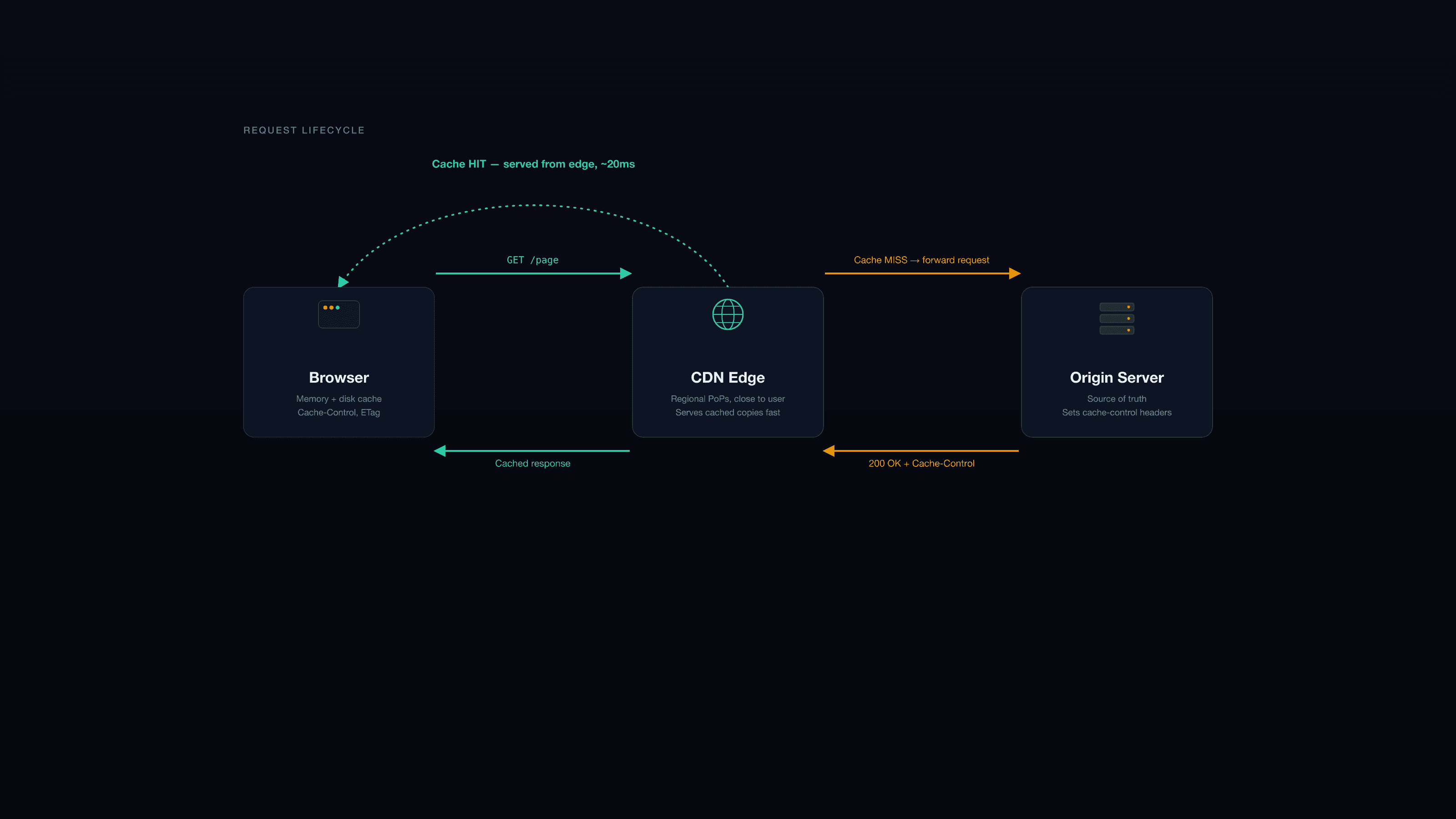
Most caching bugs aren't caused by caching too little — they're caused by nobody being able to explain, precisely, which layer is holding onto stale content. "It's cached somewhere" is the debugging equivalent of a shrug, and it usually takes longer to find the stale layer than it would have taken to design the caching strategy deliberately in the first place. Three layers sit between your server and the user, each with a different job, and being explicit about what each one does removes most of the mystery.
Layer 1: the browser
The browser caches responses locally so repeat visits and repeat navigations don't re-fetch everything. You control this entirely through the Cache-Control header your server sends — there's no separate "browser cache config," just this one signal.
For static assets with hashed filenames (main.a1b2c3.js, logo.9f8e7d.png — anything your build tool fingerprints), use an aggressive, long cache: Cache-Control: public, max-age=31536000, immutable. This is safe specifically because the hash changes the URL on every deploy — the browser caching the old file for a year doesn't matter, because a new deploy references a new URL entirely. This is the single highest-leverage caching decision most sites get wrong by being too conservative.
For HTML and unhashed URLs, use a short max-age or no-cache (which, despite the name, still allows caching — it just forces revalidation with the server before using the cached copy). You want users to get content updates promptly; a stale HTML shell serving old script references can break a page entirely if a hashed asset it references no longer exists.
Never cache personalized or sensitive responses in the browser — account pages, anything behind auth, anything with user-specific data. Use private (cacheable, but only by the browser, not shared caches) or no-store (not cached anywhere, full stop) depending on sensitivity.
Layer 2: the CDN
A CDN sits between the browser and your origin server, caching responses at edge locations close to the user. The first request for a given URL from a given edge location is a cache miss — it hits your origin, gets the response, and stores it. Every subsequent request from that region gets served from the edge, often in single-digit milliseconds, until the cached copy expires or gets purged.
The CDN takes its cues from the same Cache-Control header your server sends (or from CDN-specific rules layered on top, depending on your platform) — there usually isn't a separate configuration step beyond setting the right headers at origin, though platforms like Cloudflare let you override this with page rules if you need finer control than your application can express.
What belongs at the CDN layer: static assets (always), and cacheable public HTML — blog posts, marketing pages, anything that renders the same for every visitor. What doesn't: authenticated pages, API responses containing user-specific data, anything that must reflect the current moment (a live inventory count, for instance).
Invalidation is the part teams forget to plan for. A CDN cache that never gets purged on content change will happily serve a blog post that was corrected an hour ago to every new visitor until the TTL expires. Platforms like Vercel and Netlify handle this automatically on deploy for content baked into the build; for content coming from a CMS via revalidation, you need an explicit purge or revalidation trigger — a webhook on publish, not a fixed timer alone, if freshness actually matters.
Layer 3: the server
Server-side caching reduces load on your database and application logic — cached query results, cached API responses, cached rendered HTML fragments — rather than caching the final response delivered to the browser. This is the layer most people mean when they say "backend caching," and it's invisible to the browser and CDN entirely; it just makes your server respond faster when it does get hit.
In Next.js specifically, this maps to the framework's built-in caching primitives: the fetch cache (controlled by fetch's next.revalidate option) and the full route cache for statically renderable routes. Invalidate deliberately using revalidatePath or revalidateTag when underlying data changes — triggered from a webhook, a Server Action, or a CMS publish event — rather than relying purely on a time-based revalidation window, which always trades some staleness for simplicity.
Time-based vs. event-based revalidation is the real decision here: time-based (revalidate: 60) is simpler to reason about and fine for content where a minute of staleness is a non-issue. Event-based (webhook triggers a specific revalidateTag call) is more work to wire up but eliminates the staleness window entirely — the right choice when a client publishes a correction and expects it live immediately, not within the next cache window.
Putting the three layers together
| Content type | Browser | CDN | Server |
|---|---|---|---|
| Hashed static assets (JS/CSS/images) | Long cache, immutable | Long cache | N/A (build-time) |
| Public HTML (blog, marketing pages) | Short/no-cache | Cache, purge on publish | Revalidate on publish (tag-based) |
| API responses (public, non-personal) | No-store or short | Short cache if applicable | Cache DB queries, invalidate on write |
| Authenticated/personalized pages | No-store | Bypass entirely | Standard app logic, no shared cache |
The pattern underneath all three rows: the more a URL's content is the same for every visitor, the more aggressively every layer can cache it — and the more a response is specific to one user or one moment, the more every layer needs to get out of the way.
The debugging habit that saves the most time
When something looks stale, check the layers in order, starting from the one closest to the user: hard-refresh the browser (rules out browser cache), check the CDN's cache status header if your platform exposes one (Vercel and Cloudflare both do — look for x-vercel-cache or cf-cache-status), then check whether the server-side revalidation actually fired. Skipping straight to "clear everything and hope" wastes more time than this three-step check, and it doesn't teach you anything about why it happened, which means it happens again.
Document the strategy per content type — not exhaustively, just enough that "why is this stale" has a written answer: what's cached, for how long, and what triggers invalidation. Six months later, when a new developer or a client asks why a published change took twenty minutes to appear, that document is the difference between a confident answer and an afternoon of investigation.
We design caching strategy deliberately into every Next.js and headless CMS project we build — it's part of the performance budget set during the build phase, not a fix applied after launch when someone notices the site feels slow. If your site's caching behavior feels unpredictable and nobody's fully sure why, get in touch — this is usually a half-day audit, not a rebuild.
Related reading
- WordPressWordPress Performance: Caching, Images, and Core Web VitalsThe three levers that move WordPress performance the most — page and object caching, image delivery, and script load order — in the order we actually fix them on client sites, with the tradeoffs at each step.
- PerformanceINP, LCP, CLS: How to Improve Core Web Vitals Step-by-StepConcrete steps to improve each Core Web Vital — measurement, fix order, the images/fonts/scripts that cause most failures, and performance budgets that stop regressions coming back.
- PerformanceWebsite Speed Audits: A Repeatable Process That WorksA fixed process for running speed audits that actually produce comparable results over time — the test-set discipline, the lab-vs-field data distinction, and how to prioritize fixes that move the needle.
More in WordPress